Work across languages as if they weren't there
TeamGlot.com is a secure European collaboration platform offering live-translated team workspaces for national and global business.
Local language, global collaboration – Secure data processing in accordance with GDPR
GDPR-secured and encrypted in the EU.
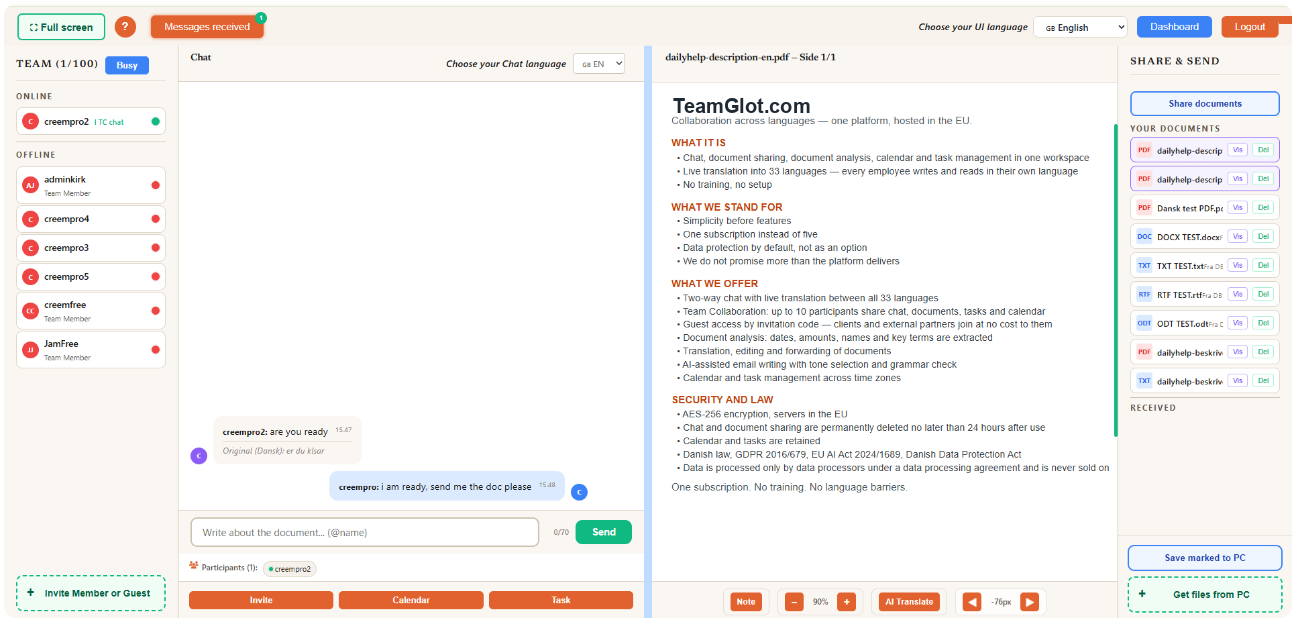
- Document sharing & Chat simultaneously: Bring together up to 10 nationalities on one platform. Chat and share documents with live translation.
- Efficient Teamwork: Streamline your workflow with an integrated calendar and task management. Communicate freely across languages with automatic message translation.
- Efficient document editing and sharing: Translate, edit and analyze data. Prepare your documents for fast and professional collaboration.
- Free client access at no extra cost: Involve international clients directly in the team's workflow. The platform provides live translation of both chat and document reading in up to 33 languages.
- EU Servers GDPR: All data is encrypted with AES-256 and hosted on secure EU servers. Calendar and tasks are retained, while chat and document sharing are permanently deleted after a maximum of 24 hours.
Three steps to a borderless team
Invite your team
Add team members from any country. Everyone keeps their own language — no training needed.
Work as usual
Chat, write emails, share documents. TeamGlot translates everything in real time — silently.
Collaborate freely
Review documents together, schedule across timezones, assign tasks. Language becomes invisible.
One workspace. Every tool. All languages.
Why juggle four apps when one does it better?
Team Collaboration
Team coordination & task management Live chat & document translation Secure file sharing and visual capacity management
Document editing
Edit & translate. OCR AI translation & AI tools.
Calendar
Visual resource overview, habit plan, AI planning & team calendar management, notifications
Task Management
Kanban task management, create, delegate & collaborate on team tasks with selected participants in a visual workflow
Chat
Real-time translations in your chosen language, invite guests and communicate with teams
Email editing
Paste email and edit your reply with AI tools & translation
One flat price. No per-user fees.
- 2 way chat: 50 messages/month
- Email writer: 10 email/month
- Calendar view
- Doc editing 5/month
- Task manager
- Doc transfer
- Team collaboration
- 2-way chat: 1,000 messages/month + Free guest invitation
- Unlimited 2-way chat: Basic-Pro-Team
- Email writing
- Calendar
- Task management
- Document editing
Transfer 12/month / 5 MB - Team collaboration
- Free unlimited 2-way chat
- Free guest invitation
- Calendar
- Task management
- Email writing
- Document editing
Transfer unlimited / max 20 MB per 24h - Team collaboration
- All in Pro
- Ideal for businesses
- 5 users included
Invite your team or external guests with a secure invitation code. Chat live and share documents back and forth with instant translation in 33 languages. Everything happens in real-time on one shared page — completely without language barriers.
Ready to make language invisible?
Start your free trial today. No credit card. No commitment.